 Français CA
 English CA
 English US
 Español US


Tax Exemption Guide
Thanks for your interest in placing an order with Flexpipe. If you have a sales tax exemption, it's important that you follow these steps before placing an order:
Quick Start
If you have an existing account with us, then we recommend that you log in to your account and try to upload your exemption certificate here:
If you see a message about being unable to upload your exemption certificate, then please contact customer support and ask them to finish setting up your account.
Detailed Documentation
The Quick Start section above should guide you through the process of adding your exemption certificate. However if you run into any issues, you can reference the entire process below.
- It is important that when you submit your tax exemption certificate, you use "80/20 LLC" as the business name, rather than "Flexpipe Inc"
- Create an account on this site (or login to your existing account)
- When you create your account, on the last step of the account creation process, please make sure that you check the checkbox indicating that you are tax-exempt
- It will take us a couple of business days to set up your account. At that point, we will send you an email requesting that you upload your tax exemption certificate. You will receive the request from [email protected].
- You can either upload your tax exemption certificate using:
- The email that you receive from us
- Or you can log into your account and go to the Tax Certificates page and upload your exemption certificate there
- Once you have initiated the process of uploading a tax certificate:
- Fill out your address information and proceed to the next step
- Once you get to the step of the form that begins with "Business Information", you will have two options:
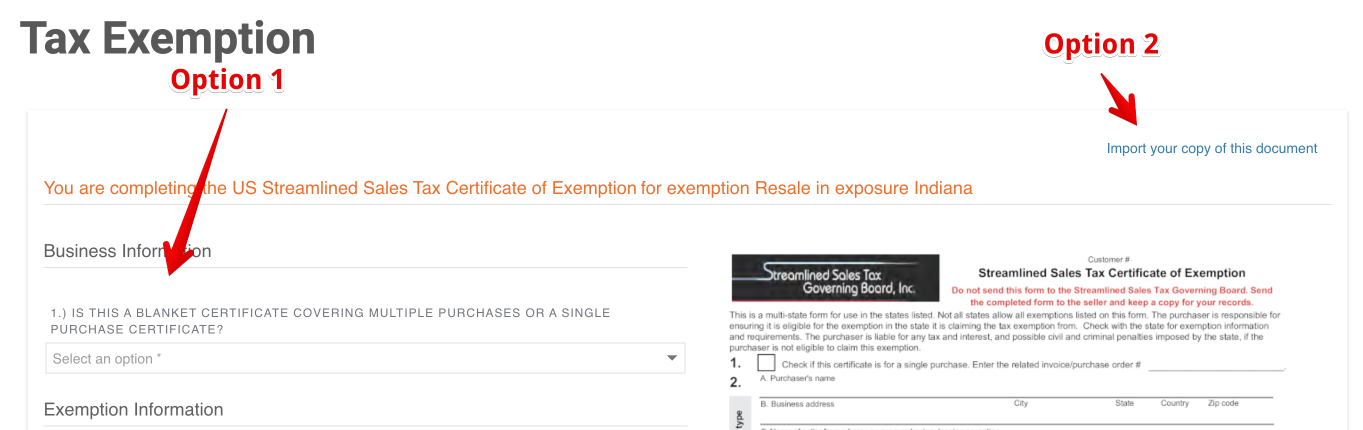
- Option 1 (recommended, since you'll be able to checkout immediately after completing the form): You can input all of your information into the form fields and the tax exemption certificate will be generated for you. Under the "Seller Information" heading, enter
80/20 LLCinto the "Seller Contact Person" and "Doing Business as Name (DBA)" fields. - Option 2: Alternatively, upload your existing exemption certificate. The downside of this option is that you'll need to wait to checkout until our team manually reviews and approves your document (within one business day). If your tax exemption form has a seller or vendor information box, make sure you fill the box with our information:
80/20 LLC
1701 S 400 E
Columbia City, IN 46725
- Option 1 (recommended, since you'll be able to checkout immediately after completing the form): You can input all of your information into the form fields and the tax exemption certificate will be generated for you. Under the "Seller Information" heading, enter
- Once you submit the tax exemption form:
- If you went with "Option 1", your certificate will be automatically approved and you'll be able to proceed to checkout as tax exempt. NOTE: If you are still seeing tax being charged, please contact us.
- If you went with "Option 2", we will need to manually review your exemption certificate within one business day. Please come back after one business day and try to check out, and your order should not be charged taxes.